
Use Ancestry.ca Like a Pro
Ancestry.ca Library Edition is a key resource for genealogical or historical research. The database includes census information, vital records, immigration and military records, photos, maps, and gazetteers (geographical indexes). With so many records from around the world, it can seem a bit overwhelming.
To help you get started, our Local History & Digital Archives Coordinator, Kaitlin, has gathered some of her favourite tips for exploring your family history using this powerful resource.
Kaitlin's Top 5 Tips for Using Ancestry.ca
These practical tips will help you search more effectively and get better results from the start. Ancestry.ca Library Edition is available to use in BPL branches, whether you're on a library computer or your own device.
Tip #1: Use all Available Options
When searching an ancestor’s name, include as much information as possible in the available search fields—especially if your ancestor had a common name. The more details you provide, the more relevant your results will be.
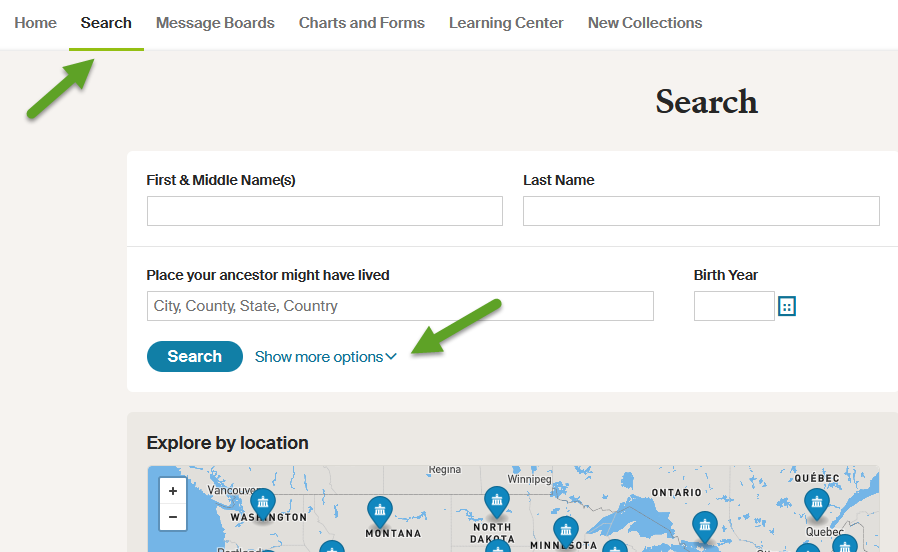
Once you've accessed Ancestry.ca through the library, click on "Search" in top main menu, and then select "All Collections" from the drop-down options. In the main Search box, click “Show more options” to see all available search fields.
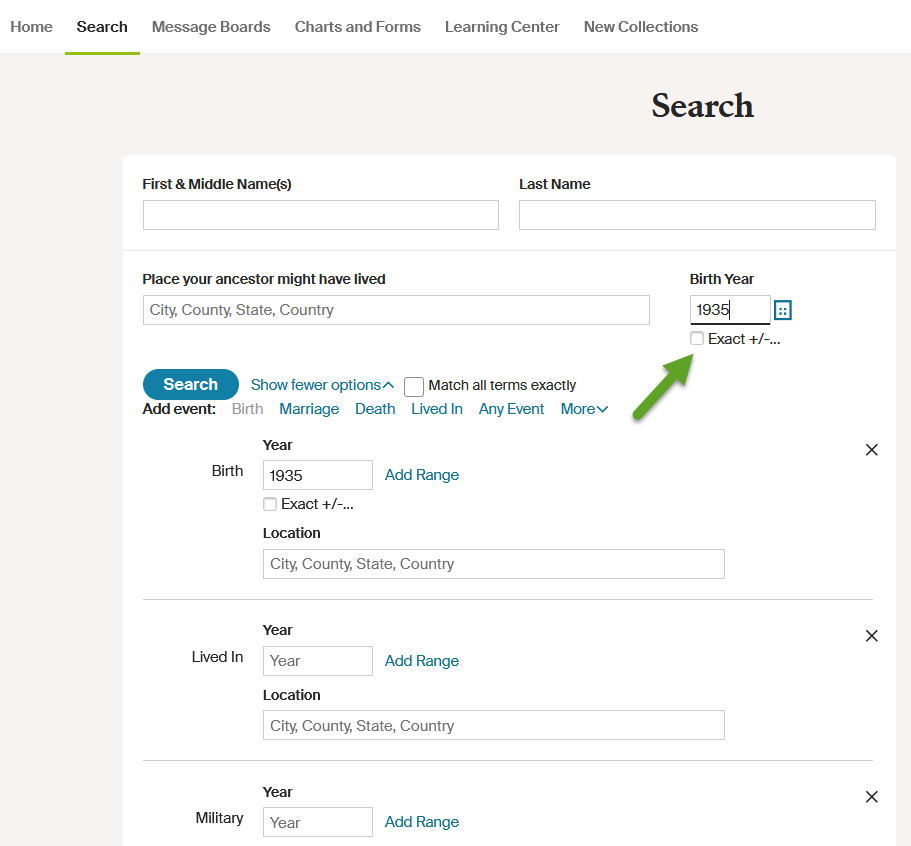
Fill in as many search fields as you can. Not sure about a date? Use the “Exact” button under each field to broaden or narrow your search.
Tip #2: Use Boolean Operators
Also known as wildcards, these symbols help search for names that may have multiple spellings or were recorded as a typo. Your ancestor’s name could have easily been recorded with an extra ‘r’ or a missing ‘e’ that now makes them hard to find.
Use an asterisk * to help search for variations or abbreviations in spelling. Searching Eliz* can turn up Elizabeth, Eliza, Elizah and others.
Similarly, use a question mark “?” to help find results that include only one letter difference. Searching Sm?th can turn up Smith or Smyth.
Tip #3: Filter Results
Ancestry’s seemingly endless records are helpful but can also be overwhelming. Use the filters on the left side of the results page to narrow your search by collection, location and record date.
For example, filter by collection if you are only interested in finding a marriage certificate or passenger list for immigration. This will save you from sifting through records you’re not interested in.
Tip #4: Check for Accuracy
Historical records aren’t perfect, and neither is our memory. If you find a record that closely matches what you know except for a small discrepancy (such as a slightly different date), consider saving it. You may later come across another document that confirms a record error or that stories passed down by family members are slightly off.
Examine every record on Ancestry with a critical eye for accuracy and relevancy. At the same time, all family history passed down through storytelling should be confirmed by historical records.
Tip #5: Send Your Find Home
Although Ancestry Library Edition does not allow you to create an account, you can still easily download, print or email documents to yourself for personal filing.
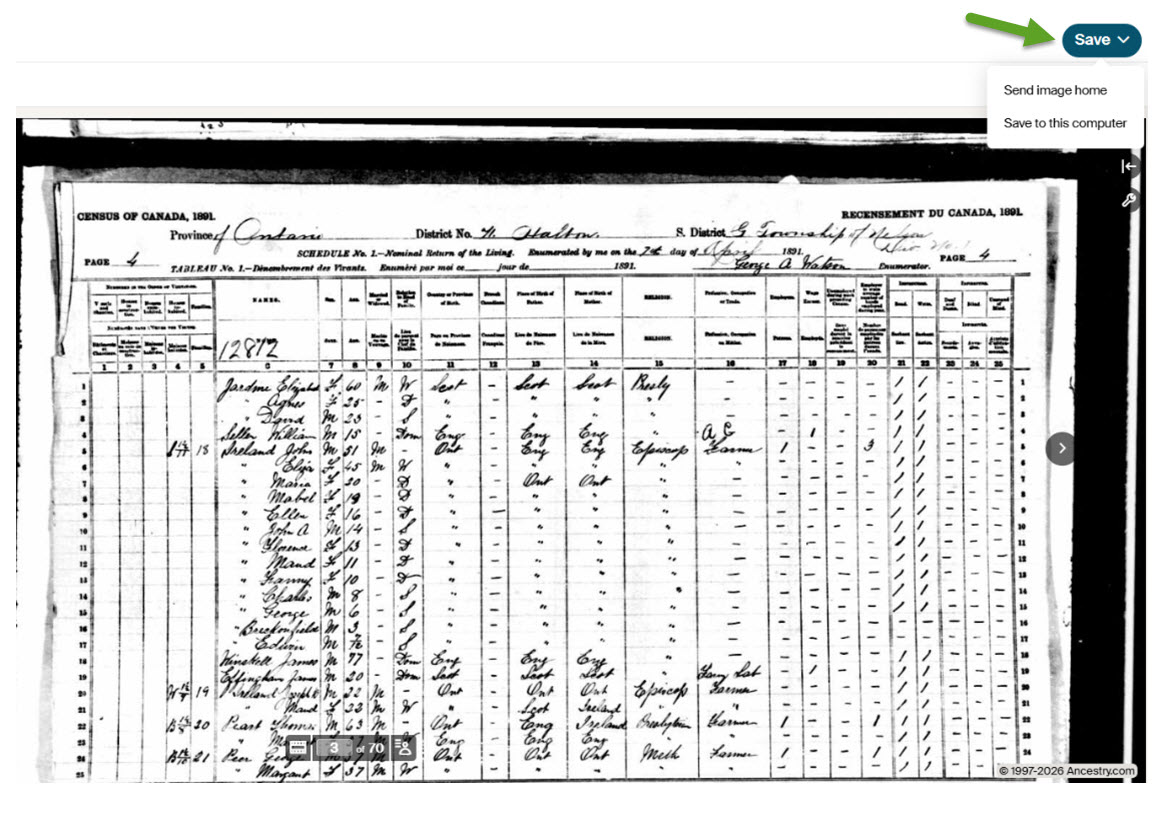
On a document’s preview page, look for the “Send Your Find Home!” box to email the page to yourself. Or, if you open the document, you will see a “Save” button in the top right corner with options to email or download to a computer for printing.
Connect to Ancestry.ca
Look under RESOURCES on the library website, under Learning & Research > Reference & Research. You can use Ancestry.ca Library Edition inside a library branch. And anyone can use this resource—no library card number is needed. Make sure you bring a USB flash drive to the library to download your records.
For more help with genealogy research, check out our Getting Started with Genealogy article.